Long talks in, vertical clips out.
Drop in a 30-minute sermon, talk or podcast. OpenClip transcribes it on your Mac, finds the moments that stand on their own, follows the speaker's face, burns in captions and exports 9:16 clips. Free, open source, and nothing is uploaded.
macOS 13+. MIT license. No account, no watermark, no upload.
Wide in, tall out.
Just 3 Steps.
Drop
Drop a video in. It is transcribed and faces are found, on your Mac.
Pick
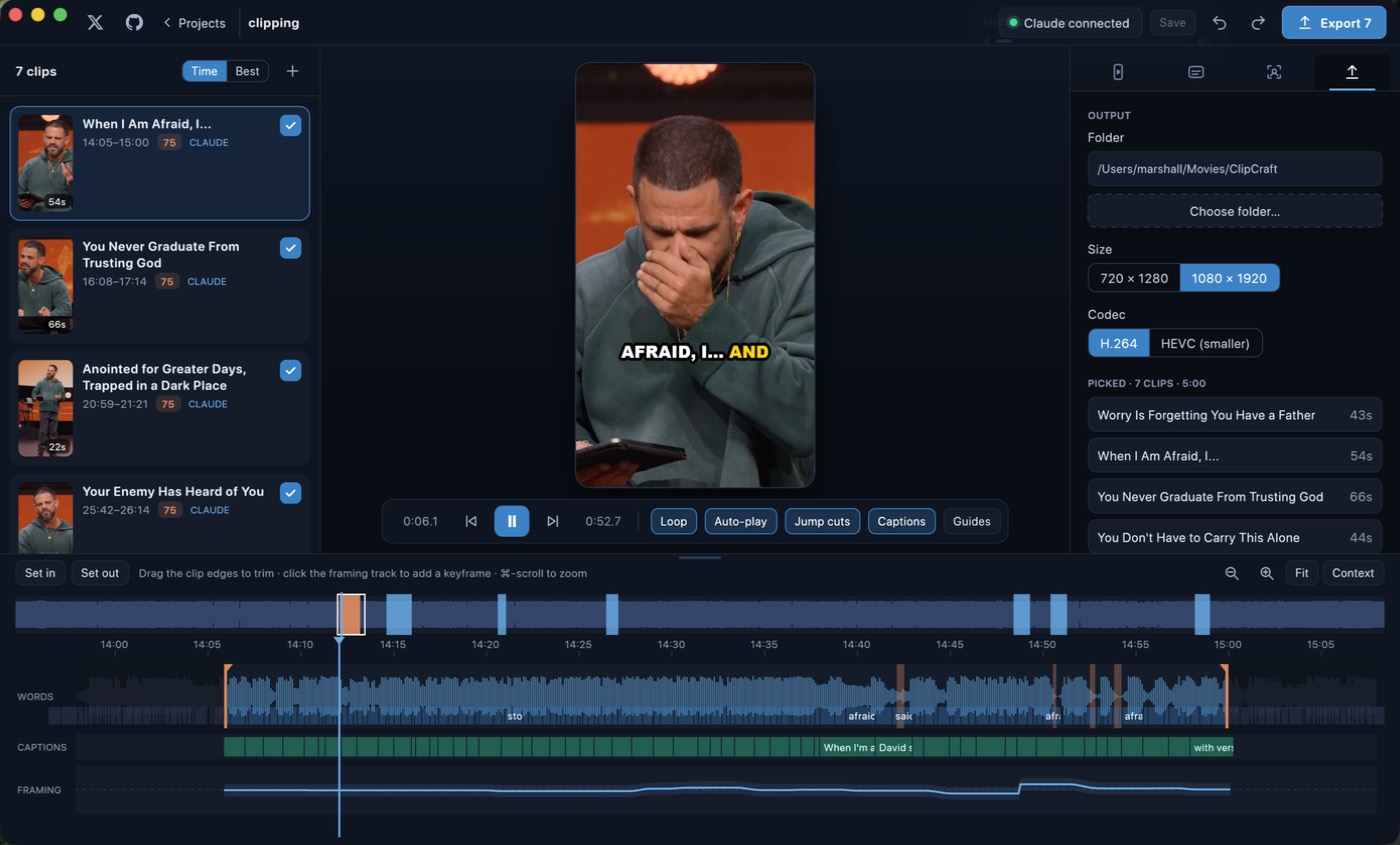
Claude, or the built-in Quick pick, suggests 5 to 10 moments. Arrow through them in a real 9:16 player.
Export
Tick the clips you like and export them all in one batch.
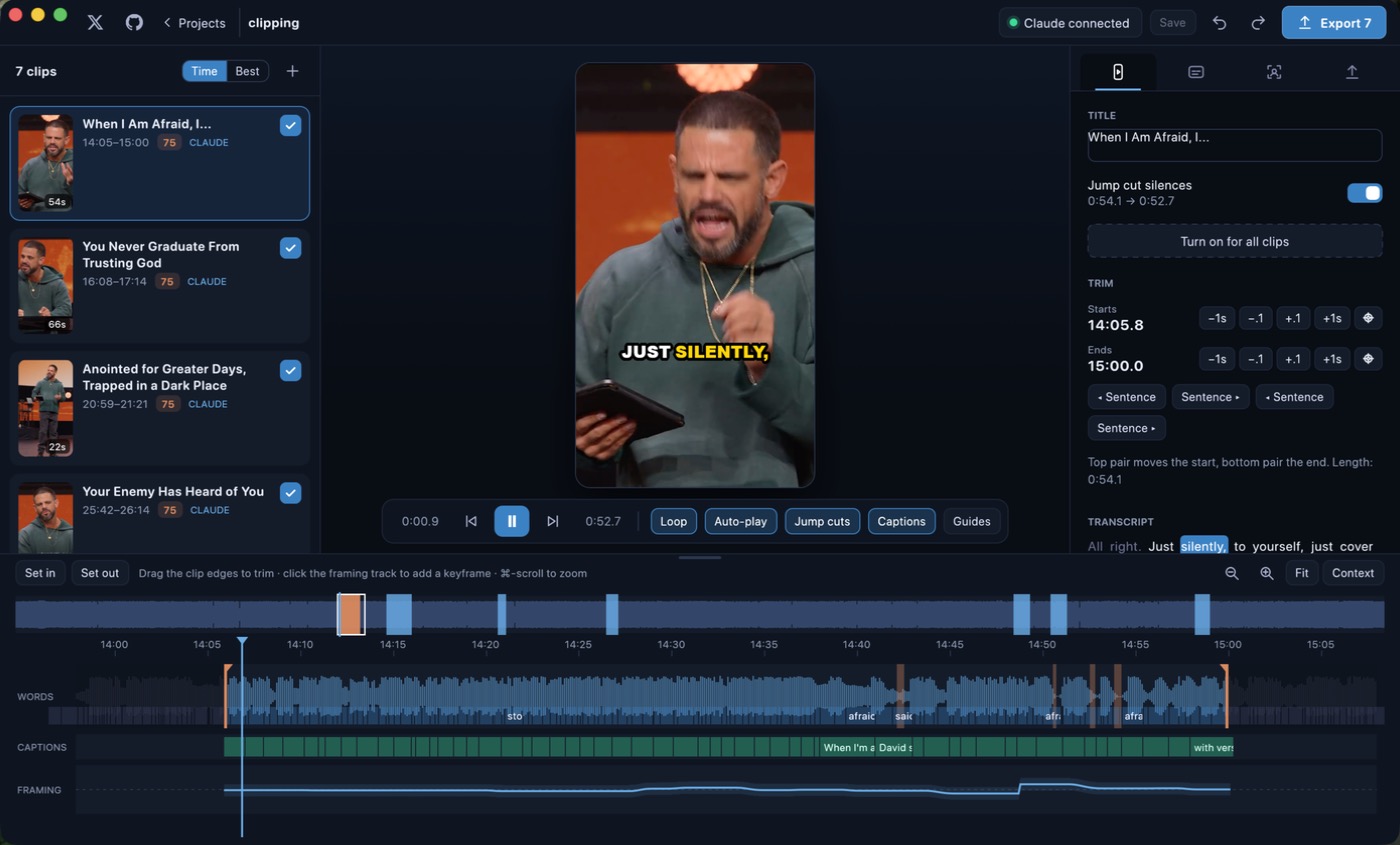
Suggested clips, ready to play
Every suggestion opens in a real vertical player and autoplays as you arrow through the list. Tick the keepers, dismiss the rest, and trim any clip on its own timeline with waveform, words and word-snapping edges.
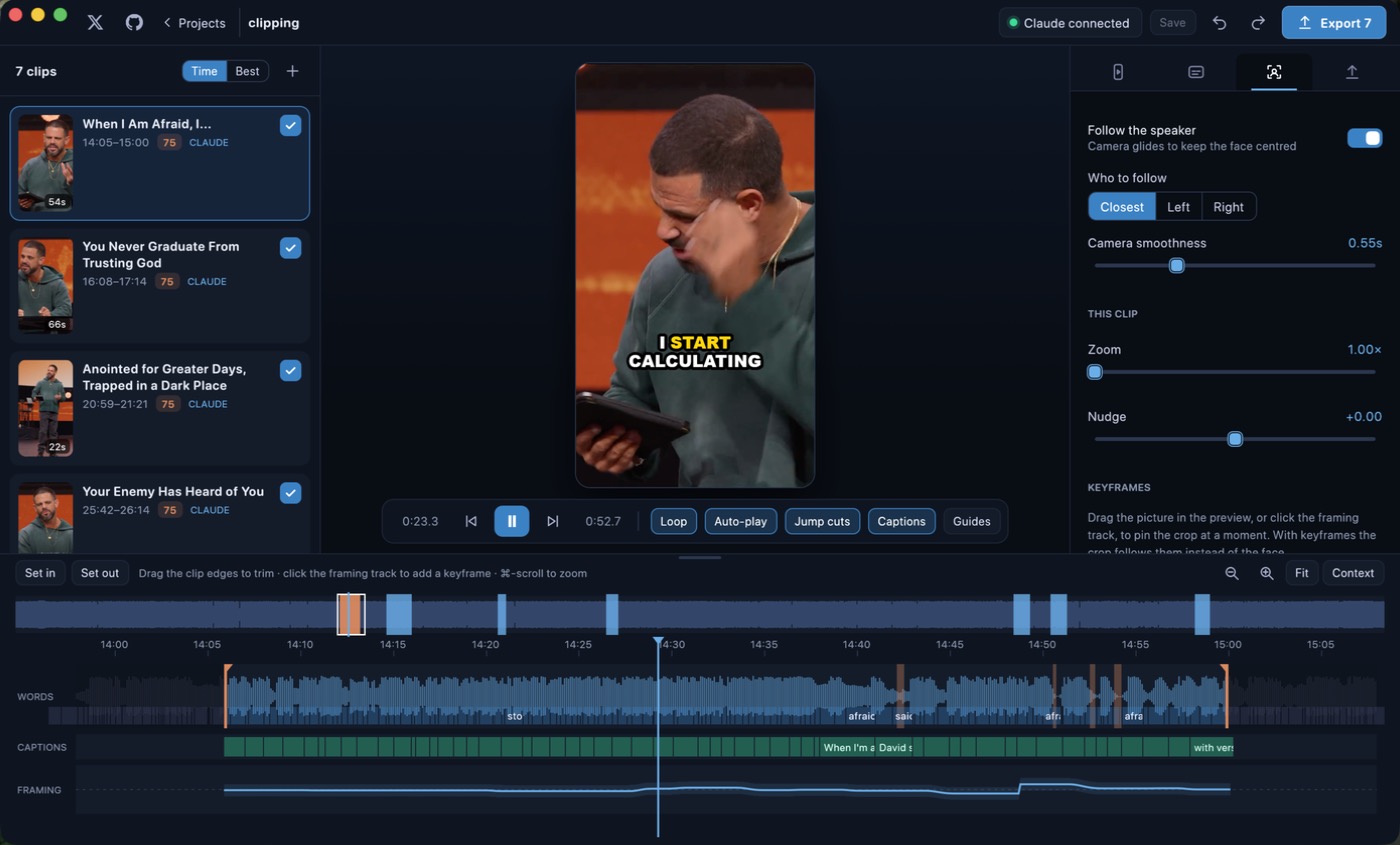
A camera that follows the face
The virtual camera holds still while the speaker stays centred, glides when they move, and cuts when your source cuts between cameras. Choose who to follow, set the zoom, nudge it, or drop keyframes by dragging the preview.
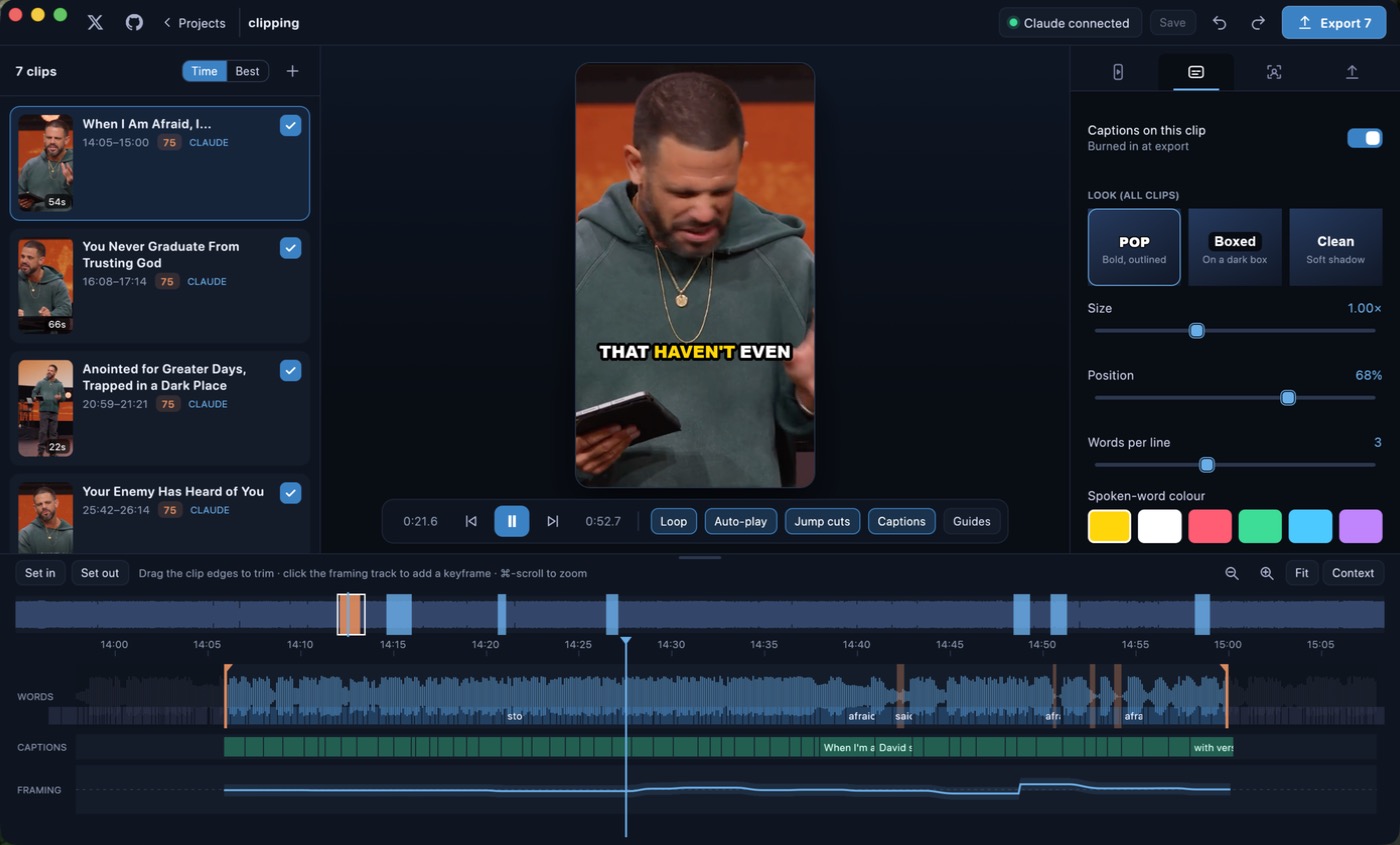
Captions burned in, made on your Mac
Transcription runs on whisper.cpp with the Metal GPU. Pick the Pop, Boxed or Clean look, highlight the spoken word, set size, position and colour, and fix a word by double-clicking it.
Batch export, hardware encoded
1080×1920 or 720×1280, H.264 or HEVC with AAC audio, up to 30 fps. Encoding goes through the Mac's own AVFoundation and VideoToolbox, so there is no bundled codec to license.
Claude picks the moments
- Local MCP server
openclip-mcpships inside the app. Claude Desktop or Claude Code launches it on your Mac over stdio. Nothing is hosted, and there is no account or API key.- Cheap on tokens
- Claude reads about twenty pre-ranked, sentence-aligned candidates instead of the whole transcript: a few thousand tokens regardless of video length, in two calls.
- Clips appear live
- Claude saves clips by sentence id and they show up in the app as it works. No Claude? Quick pick scores the moments locally.
The rest of the app
- Jump cuts
- One toggle removes the silences between sentences, in the preview and in the export.
- Clip timeline
- Waveform, words, caption blocks and the framing path. Drag edges with word snapping, step by sentence, set in and out.
- Choose a model
- Fast (base.en), Balanced (small.en) or Best (large-v3-turbo). Downloaded once, only when you ask.
- Native app
- Rust and egui. No web view, no Electron. Captions are drawn with Core Image and CoreText.
- Plain project folders
- Projects live in
~/OpenClip Projects/and exports go to~/Movies/OpenClip. Edits stay in memory until you save. - Undo everywhere
- Undo and redo across trims, captions and framing, plus an unsaved-changes marker.
What people make with it
- Sermon clips
- Turn the Sunday service into a week of short, shareable moments.
- Podcast highlights
- Pull the strongest exchanges out of a long recording with captions already on.
- Talks and lectures
- Cut a conference talk into self-contained ideas.
- Interviews
- Follow whoever is speaking and drop the dead air with jump cuts.
- Webinars
- Reuse the best answers from a long Q&A as vertical shorts.
- Training videos
- Split a long session into short, single-topic clips.
Why clip locally
| OpenClip | Cloud clipping tools | |
|---|---|---|
| Price | Free, MIT licensed | Often a subscription |
| Watermark | Never | Often on free tiers |
| Account | None | Usually required |
| Where footage goes | Stays on your Mac | Uploaded for processing |
| Transcription | On-device, whisper.cpp | Often cloud transcription |
| Picking moments | Claude through a local MCP server, or Quick pick | Built-in, hosted |
| Source code | Open on GitHub | Closed |
| Works offline | Yes, after the optional model download | No |
| Project files | Plain folders you own | Tied to an account |
| Telemetry | None | Often collected |
| Platforms | macOS | Browser |
A general comparison, not a claim about any one product. Check any tool's current terms before you choose.
Fast enough to stay in flow
- Import
- A 75-minute, 2 GB 720p sermon was transcribed and its faces found in about 8.5 minutes. Transcription ran near 9× realtime on small.en.
- Export
- A 32-second clip exported in about 12 seconds, roughly 2 to 3× realtime.
Measured on an M-series Mac. Your numbers depend on the chip, the model and the source video.
Quick keys in the editor
- Space Play and pause.
- ↑ ↓ Previous or next clip.
- X Return Tick the clip for export.
- [ ] Set the clip's in and out points.
- T Toggle jump cuts.
- ⌘ E Export.
What's new
0.2.0: native rewrite
- Native rewrite in egui. OpenClip is now a single native Rust app with no web view.
- Renamed from ClipCraft to OpenClip.
- OS-licensed encoders only. Export uses AVFoundation and VideoToolbox; there is no ffmpeg and no openh264.
- Faster UI.
0.1.0
- First release as ClipCraft. Import, whisper.cpp transcription, Vision faces, local scoring, MCP server, 9:16 preview, face-following camera, captions, timeline, batch export, jump cuts and unsaved-changes tracking.
Built in the open
The whole app and this website live in one repository. Read it, file an issue, or send a fix. OpenClip is a sibling of ScreenCraft, the open-source screen recorder and editor.
Free under the MIT license. No account, no telemetry, no cloud rendering. Everything is transcribed, framed, captioned and exported on your own Mac, by a native Rust app.
Turn your next talk into a week of clips.
Free for macOS. Download it, drop a video in.